

LinkedIn Post Length Guide
LinkedIn posts can be up to 3,000 characters long. But the right length for your post depends on what you're trying to say and who you're saying it to. For most professionals, posts between 150 and 300 words hit the sweet spot — long enough to deliver real insight, short enough that people actually finish reading.
- LinkedIn's character limit is 3,000 characters (roughly 400–500 words)
- Posts between 150 and 300 words tend to generate the strongest engagement
- The first ~210 characters appear before the "See more" fold — treat them as your hook
- Short posts work for quick takes; longer posts work for deep analysis
- Vary your length based on content type rather than defaulting to one size
What is LinkedIn's character limit?
LinkedIn allows up to 3,000 characters per standard post. That includes spaces, line breaks, emojis, and any Unicode-formatted text (bold, italic, bullet characters). According to LinkedIn's own help documentation, this limit applies to feed posts created through the share box on desktop and mobile.
The 3,000-character cap translates to roughly 400–500 words, depending on your average word length. That's enough space for a substantial piece of writing — comparable to a short blog post.
Other LinkedIn content types have different limits:
- Comments: 1,250 characters
- Articles: up to 110,000 characters (roughly 15,000–18,000 words)
- Newsletters: same as articles
- Headlines: 220 characters
- About section: 2,600 characters
How long should a LinkedIn post be?
There's no single ideal length. The right word count depends on what you're communicating and how much depth the topic requires.
Quick thoughts and hot takes: 50–100 words. A single sharp observation, a contrarian opinion, a brief reaction to news. These posts are fast to write and fast to read. They work best when the idea is strong enough to stand without explanation.
Personal stories and insights: 150–250 words. Enough room to set up context, share an experience, and land a takeaway. This range forces you to edit — which usually makes the writing better. According to Buffer's analysis of 4.8 million LinkedIn posts, content in this range consistently drives strong engagement relative to the effort required.
In-depth analysis: 250–400 words. Industry breakdowns, lessons from a specific project, detailed how-to content. You need this length when the topic genuinely requires context and nuance. Posts in this range tend to generate more saves and shares — signals that LinkedIn's algorithm weights heavily.
Comprehensive guides: 400+ words. Use sparingly. Engagement often drops on very long posts unless you're an established voice with an audience that expects depth. If your post regularly exceeds 400 words, consider whether it would work better as a LinkedIn article or newsletter.
What is the "See more" fold?
On desktop, LinkedIn truncates posts after approximately 210 characters (about 3 lines of text) and displays a "See more" link. On mobile, the cutoff is similar. Everything after that fold is invisible until the reader clicks.
This makes your opening lines the most important part of any LinkedIn post. They determine whether someone reads the rest or scrolls past.
Effective hooks before the fold:
- Lead with the payoff. Don't build up to your point — state it immediately. "I tripled my response rate by changing one line in my outreach" is more compelling than "Last week I was thinking about my outreach strategy..."
- Create an information gap. Make people curious enough to click. A specific claim ("3 mistakes I see in every junior developer's LinkedIn profile") works better than a vague one ("some thoughts on LinkedIn profiles").
- Use line breaks. Short lines with whitespace between them are easier to scan. A dense paragraph above the fold looks like work to read.
According to LinkedIn's engineering blog, posts where users click "See more" tend to receive broader distribution — the click signals genuine interest, which the algorithm interprets as a quality signal.
Does post length affect engagement?
Length alone doesn't determine engagement. A 50-word post with a sharp insight will outperform a 400-word post that rambles. But length does correlate with different types of engagement.
Shorter posts (under 150 words) get read in full more often. They're easier to react to with a quick like or emoji. They work well in high-frequency posting strategies where each post is a single idea.
Longer posts (200–400 words) tend to generate more comments and saves. When someone invests time reading a detailed post, they're more likely to respond with their own perspective. Sprout Social's 2025 analysis found that text-only posts with strategic formatting (line breaks, bullets, bold) maintain engagement even at higher word counts — formatting compensates for length by keeping the post scannable.
The worst-performing length isn't short or long — it's the middle ground where a post is too long to scan but too shallow to reward a careful read. Either commit to brevity or commit to depth.
How Lunatic AI handles post length
When you create a post in Lunatic AI, the post enrichment settings include a length preference option. You can set a default for each post:
- One-liner — punchy, single-paragraph posts
- Micro — short and focused, under 100 words
- Medium — the default sweet spot, 150–250 words
- Long — in-depth content, 250–400 words
- Novel — comprehensive long-form, 400+ words
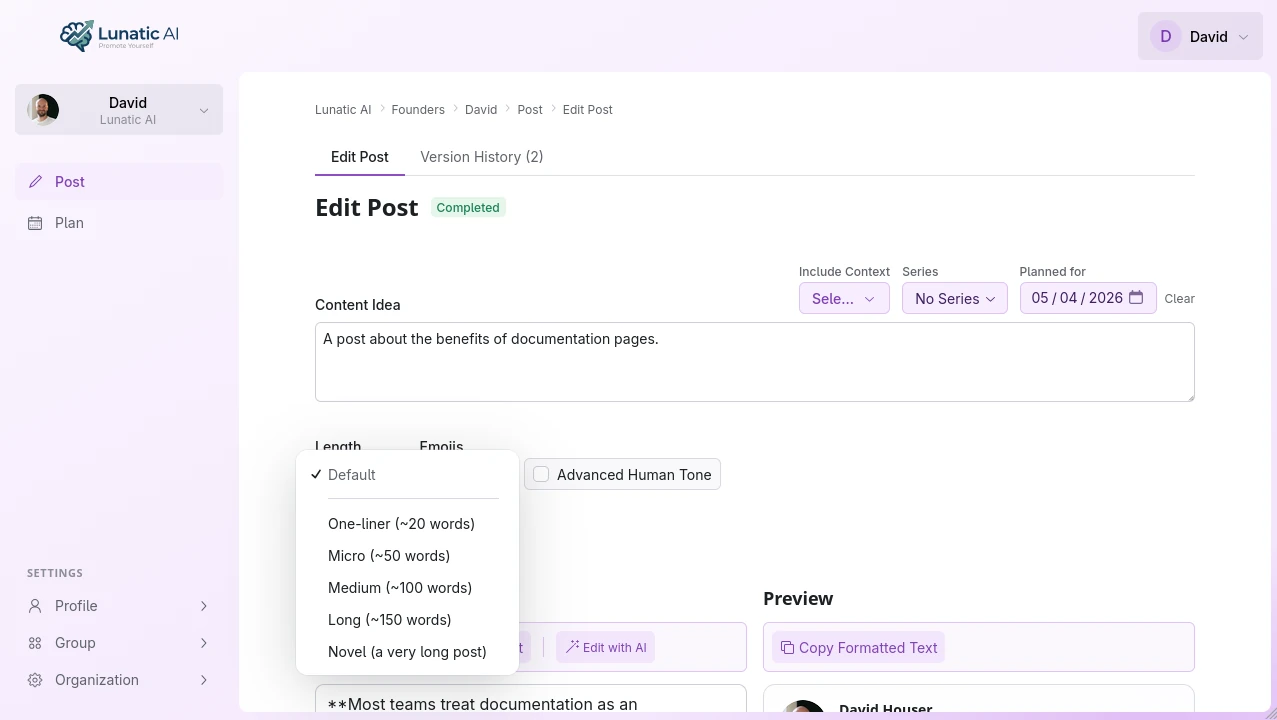 Post length preference options in Lunatic AI
Length preference can be set per post or left to the voice profile default
Your voice profile also captures your natural length tendency from the onboarding questionnaire. If you typically write short, punchy posts, the AI defaults to that style. The per-post enrichment option overrides the default when a specific piece of content calls for a different length.
Frequently Asked Questions
Start creating posts at the right length
Lunatic AI matches your voice and respects your length preferences. Free plan available.
Start Now