

Post Enrichment
Post enrichment options are per-post settings that override your voice profile's defaults for a specific post. They control length, emoji usage, tone quality, and the additional context sent to the AI during generation. Set them when you want a single post to deviate from your usual style without changing your voice profile.
- Per-post overrides — don't change your voice profile permanently
- Length preference: one-liner, micro, medium, long, or novel
- Emoji toggle: include or exclude emojis for this post
- Advanced Human Tone: extra quality pass to reduce AI-sounding patterns
- Included context: send your organization or group description to the AI
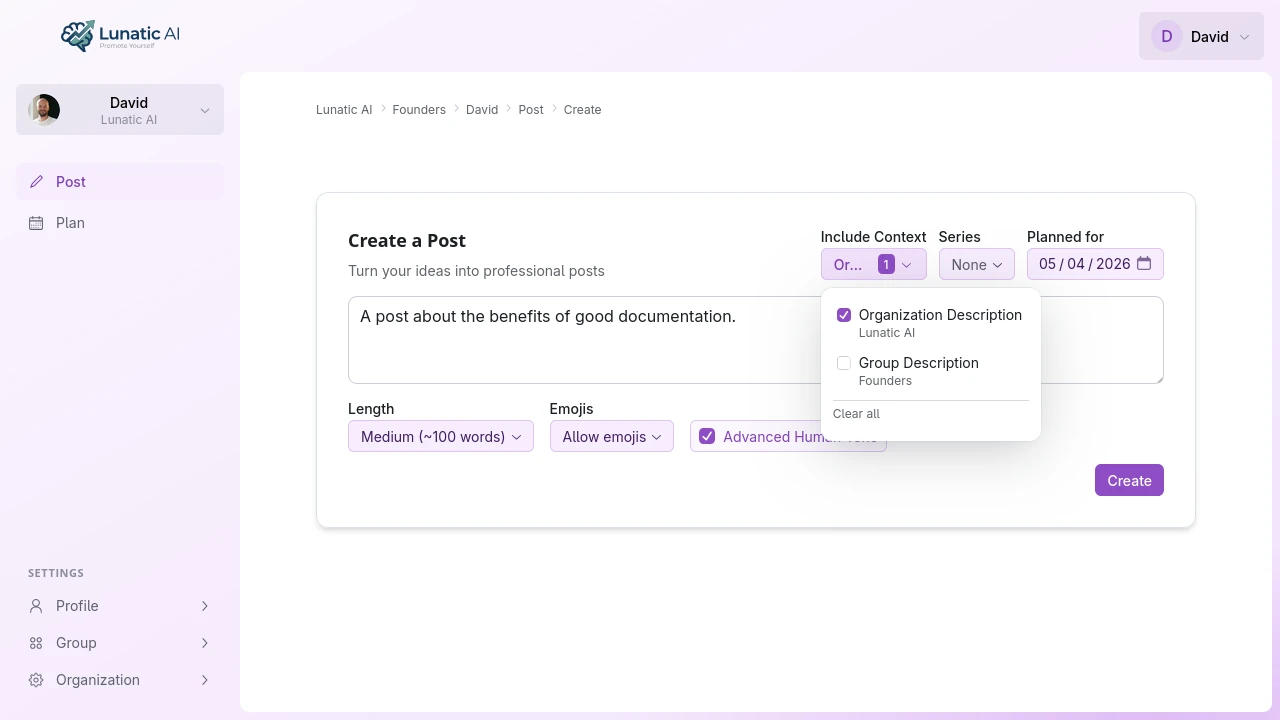 Post enrichment options showing length, emoji, and Advanced Human Tone settings
What enrichment options are available?
Four settings, all optional:
Length Preference — controls how long the generated post will be. Five options:
- One-liner — 1–2 sentences. Good for punchy takes and hot opinions.
- Micro — 3–5 sentences. Enough for a single point with context.
- Medium — 1–2 paragraphs. The most common LinkedIn post length.
- Long — 3+ paragraphs. For storytelling, detailed explanations, or case studies.
- Novel — full long-form. Multiple sections, detailed arguments.
This overrides whatever length tendency your voice profile has baked in.
Emoji toggle — a simple on/off for emoji usage in this specific post. If your voice profile tends to include emojis but you want a more formal post, switch it off here.
Advanced Human Tone — an additional quality pass that checks the generated content for:
- Repetitive sentence openers ("I think...", "I believe...", "It's important to...")
- Monotonous sentence length (every sentence roughly the same word count)
- Filler phrases that signal AI output
- The flat cadence that makes readers think "a bot wrote this"
The check adds a few seconds to generation time but can produces more natural-sounding output.
Included Context — optionally sends your organization description and/or group description to the AI. This gives the AI background on your company or team that it can weave into the post where relevant. Useful when you want posts to reference your business without manually adding that context to every idea.
When should I use Advanced Human Tone?
When a generated post reads fine on the surface but something about it feels off. The content is accurate, the structure works, but it has that unmistakable "AI wrote this" quality — every paragraph the same length, transitions that are technically correct but mechanically placed, a sameness to the phrasing.
Advanced Human Tone is most useful for longer posts where these patterns accumulate and become obvious. On a 2-sentence post, the difference is minimal. On a 4-paragraph breakdown, it can become substantial.
This is not toggled on by default as a well curated voice profile can produce excellent content that sounds just right to you without the additional "Advanced Human Tone" pass. Try both and see what you like better.
Where do I set enrichment options?
In the post creation form (standalone create page) or the content modal (when opening an idea from the calendar). The options appear as dropdowns and toggles alongside the idea input area.
Enrichment options are set per post. There's no global toggle — each post carries its own settings independently.
How do enrichment options interact with my voice profile?
Your voice profile defines your default writing style. It includes tendencies toward certain lengths, emoji habits, and tone patterns that the AI follows by default.
Enrichment options override specific aspects for one post. If you don't set any enrichment option, the voice profile's built-in preferences apply. If you do set one — say, "Long" for length — it takes precedence over whatever length pattern your voice profile would normally produce.
The override is scoped to that single post. Your voice profile isn't modified.
If you find yourself setting the same enrichment options on every post, consider retaking the onboarding questionnaire to update your voice profile's defaults instead. The questionnaire includes a length preference question that directly shapes your voice.
Try different enrichment settings
Generate a post, then regenerate it with different options to see how the output changes.
Start Now