

Best Time to Post on LinkedIn

The best time to post on LinkedIn is Tuesday through Thursday, between 8 and 10 AM in your audience's time zone. For posting frequency, 2–5 posts per week is the range that works for most professionals. But timing and consistency matter more than hitting a single optimal slot — a good post published at a mediocre time still outperforms a mediocre post at the perfect time.

Key Takeaways
  • Tuesday through Thursday, 8–10 AM is the highest-engagement window across most studies
  • Wednesday consistently ranks as the single best day to post
  • 2–5 posts per week is the recommended range; 3x/week is the sweet spot for most people
  • Weekend posts receive 50–70% less engagement for B2B content
  • Consistency beats timing — posting regularly matters more than posting at the "perfect" hour

What is the best time to post on LinkedIn?

Multiple large-scale studies converge on the same windows. According to Sprout Social's 2026 analysis (based on data from late 2025 through early 2026), the highest-engagement periods are:

  • Tuesday through Thursday, 8–10 AM — the peak window. Professionals check LinkedIn early in the workday, often before their first meeting.
  • Tuesday through Thursday, 12–1 PM — a secondary peak. Lunch-break scrolling drives a midday engagement bump.
  • Monday, 8–10 AM — good for "fresh start" content (weekly reflections, new initiatives, Monday motivation).
  • Friday after 2 PM — engagement drops steadily as people wind down for the weekend.

Buffer's 2025 analysis of 4.8 million LinkedIn posts found that engagement was concentrated almost entirely during business hours (9 AM–5 PM), with a sharp decline after 5 PM in the audience's local time zone.

One caveat: these are aggregate averages across millions of accounts. Your specific audience may behave differently. A recruiter targeting software engineers might find that evening posts perform well because developers browse LinkedIn after work. A sales professional targeting European executives might find that 7 AM posts catch early commuters. Test your own windows and let the data guide you.

What is the best day to post on LinkedIn?

Here's how the days stack up, based on data from Sprout Social, Buffer, Hootsuite, and LinkedIn's own creator research:

DayEngagement LevelNotes
MondayModeratePeople are catching up on email and meetings. Posts published before 9 AM perform best.
TuesdayHighFirst full "working rhythm" day. Strong for educational and analytical content.
WednesdayHighestConsistently the top-performing day across most studies and most audiences.
ThursdayHighSimilar to Tuesday. Good for posts that drive weekend reading (saves, bookmarks).
FridayDecliningEngagement drops through the day. Morning posts still work; afternoon posts struggle.
SaturdayLow50–70% less engagement than weekdays for professional content, per Hootsuite's 2025 data.
SundayLowestWorst-performing day for most B2B audiences.

Wednesday's dominance is remarkably consistent across studies. It appears in Sprout Social's data, Buffer's analysis, and Hootsuite's global research. The likely explanation: it's the midpoint of the work week — professionals are past Monday's catch-up, not yet in Friday's wind-down, and have settled into their routine enough to engage with content.

How often should I post on LinkedIn?

Posting frequency is more consequential than posting time. Here's what the data supports:

1–2 posts per week (minimum for visibility). Enough to stay on your audience's radar. According to LinkedIn's creator data, accounts posting at least twice per week see 5x more profile views than those posting less frequently. This is the baseline — below this, the algorithm has too little signal to distribute your content effectively.

3 posts per week (optimal for most professionals). Buffer's 2025 analysis found that 3 posts per week produces the best engagement-to-effort ratio. You're posting often enough for the algorithm to treat you as an active creator, but not so often that quality suffers or your audience feels fatigued.

4–5 posts per week (growth mode). For people building an audience actively — job seekers, thought leaders scaling their reach, sales professionals running an outbound strategy. This cadence requires either a content planning system or a stockpile of ideas. Without one, you'll hit a wall within a few weeks.

Daily posting (diminishing returns). Possible, but the marginal benefit of post 6 and 7 in a week is small compared to posts 2 and 3. Quality almost always drops when you're producing daily content without a planning system. Some established creators with large audiences sustain daily posting, but it's the exception, not the starting point.

Consistency over intensity

Posting twice every week for six months will build a stronger LinkedIn presence than posting daily for three weeks and burning out. Pick a frequency you can maintain, and treat it as a commitment rather than an aspiration.

Does posting frequency affect the LinkedIn algorithm?

Yes. LinkedIn's feed algorithm uses posting consistency as a signal for content quality and creator reliability. Here's what we know:

Regular activity signals quality. Accounts that post on a predictable schedule tend to get more distribution per post than accounts that post in bursts. This isn't a published algorithm rule — it's a pattern observed across multiple third-party analyses. The likely mechanism: consistent posters accumulate more follower engagement data, which gives the algorithm more signal to work with when deciding who sees the next post.

Burst-and-silence hurts. Posting five times in one week and then going dark for three weeks is worse than posting once per week every week. The algorithm needs recent activity to keep distributing your content. After a gap, you're effectively starting from a colder position — your first post back reaches a smaller initial audience until engagement data rebuilds.

Frequency has an upper ceiling. According to several social media analysts, including analysis published by Hootsuite in 2025, LinkedIn may throttle distribution when the same account publishes more than once within a short window (roughly 18–24 hours). This isn't confirmed by LinkedIn officially, but the pattern appears in enough third-party data to take seriously. Space your posts at least 18 hours apart.

Should I post on LinkedIn on weekends?

For most B2B professionals: no. The data is clear. According to Hootsuite's 2025 global social media benchmark, weekend posts receive 50–70% less engagement than weekday posts for professional content. Fewer people are on LinkedIn on Saturday and Sunday, and those who are tend to be browsing passively rather than engaging.

Exceptions exist:

  • Consumer-facing content. If your audience includes job seekers, freelancers, or people browsing LinkedIn as a general interest platform, weekends can work. These audiences often have more browsing time on weekends.
  • International audiences. If your followers span multiple time zones, "weekend" for you might be a workday for part of your audience. A Sunday evening post in New York reaches Monday morning in Europe and Asia.
  • Lifestyle and personal branding content. Weekend posts about hobbies, travel, or personal reflections can feel more authentic on a Saturday than a Tuesday. The tone matches the day.

If you're unsure, run a 4-week test: publish one weekend post per week and compare its performance to your weekday averages. Let the data decide.

How Lunatic AI helps with posting consistency

The content calendar in Lunatic AI lets you plan weeks of content in advance. You pick a date range, set your goals and audience, and the AI generates a calendar of ideas — each assigned to a specific date.

When you can see your content laid out across the month, gaps become obvious. An empty Wednesday stands out. A week with no posts is hard to ignore. The visual structure turns posting frequency from a vague intention into a concrete plan.

Posts can be dragged between dates to optimize timing. Content series group related posts by theme, so you're not just posting consistently — you're posting with continuity across topics.
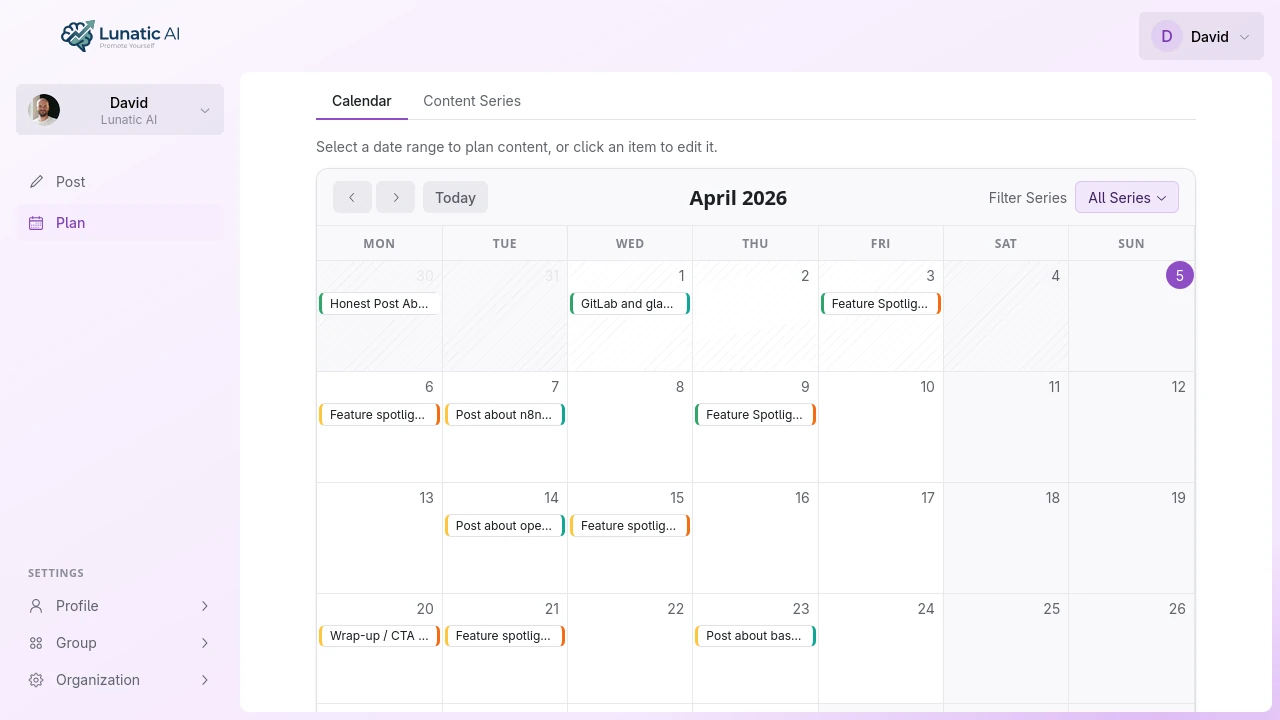
Content calendar with posts planned across the work weekContent calendar with posts planned across the work week

Content calendar showing posts distributed across the work week

Frequently Asked Questions

Plan your posting schedule

Content calendar with AI-generated ideas. Fill every slot, stay consistent.

Start Planning